← All posts
AWS API Gateway as an S3 proxy: IAM role and path parameters
Notes on exposing an S3 bucket as a REST API with API Gateway: the IAM role, its trust relationship, and folder/item path parameters.
From the archive · a 2021 working note, kept for reference.
Guides I followed:
- Tutorial: Create a REST API as an Amazon S3 proxy in API Gateway - Amazon API Gateway
- Using REST API to upload files to the S3 bucket - BlueGrid
IAM role

Edit the trust relationship
{
  "Version": "2012-10-17",
  "Statement": [
    {
      "Effect": "Allow",
      "Principal": {
        "Service": "s3.amazonaws.com"
      },
      "Action": "sts:AssumeRole"
    },
    {
      "Effect": "Allow",
      "Principal": {
        "Service": "apigateway.amazonaws.com"
      },
      "Action": "sts:AssumeRole"
    }
  ]
}
API Gateway
Next, go to API Gateway and create a REST API. Create the {folder} and {item} resources, then create a GET method:
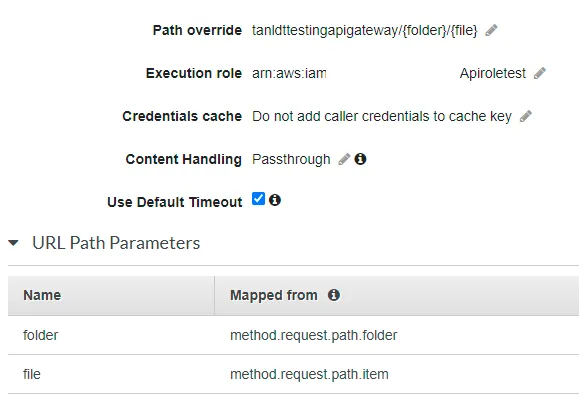
Here tanldttestingapigateway is the S3 bucket name.
On /{folder}/{item} → GET → Method Execution, add the URL path parameters.
Test
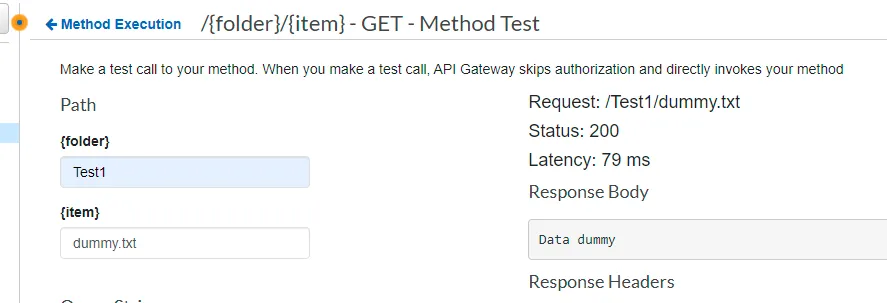
Create the folder Test1 and upload a text file for testing.
First published on tanldt.blogspot.com on May 25, 2021.